Author: Shelli Martineau

  • 8 Free Tools for Listening to Conversations in Social Media

    Imagine the last party you went to. Think about who you were with, how you presented yourself, who you spoke with and what you talked about. Now imagine a complete stranger walking up to you, opening his coat, and shouting, “Hey! Wanna buy some of our COOL watches? They’re buy one get one free if you act NOW!”

    How quickly would you run away from this strange person?

    It may seem like an exaggeration, but I assure you, that’s how awkward a sales pitch can come across in social media. If you approach people like the weird, watch-selling-trenchcoat-guy no one will want to talk to you. Even worse, you could potentially alienate yourself from the very people you hope to interact with.

    Social media is about conversation, engagement, providing good content and above all else — listening.

    As with “real life” it’s best to enter a conversation after first listening. Listening tools can help you:

    • Know the context of the conversation online and pinpoint what is being said.
    • Determine the things your potential audience likes to discuss.
    • Identify and understand the people within the social landscape (i.e. Who they are and what they want).
    • Create content (conversation) that is geared towards the people you’d like to connect with.

    8 Free Tools

    There are many Social Media listening tools at your disposal. Some of the best get quite expensive, but if you’re operating on a small budget, these 8 free tools can help you listen in on the conversation before and while you participate:

    1. Google Alerts – Get email updates of the latest relevant Google results (web, news, blogs, etc.) based on your keywords and terms. Google Alerts will monitor the web for you while you’re doing other things.
    2. Google Reader  – Google Reader is a tool for gathering, reading, and sharing all the interesting blogs and websites you read on the web. Collect relevant industry blogs in your reader and check them often.
    3. Social Mention – Social Mention provides real-time search of “100+ social media properties directly including: Twitter, Facebook, FriendFeed, YouTube, Digg, Google etc.” You can sort and filter your results (alerts to come).
    4. Topsy  – Similar to Social Mention, you can use Topsy to perform real-time searches of Google Plus and Twitter. Per Topsy, “Topsy is a realtime search engine powered by the Social Web. Unlike traditional web search engines, Topsy indexes and ranks search results based upon the most influential conversations millions of people are having every day about each specific term, topic, page or domain queried.”
    5. Hootsuite &/Or Tweetdeck: Organize your search with the help of columns. You can search keywords, phrases, hashtags, twitter lists, etc. Nik Hewitt wrote a great post about optimizing your Hootsuite searches.
    6. Twitter Trends Map  – Trendsmap is a great way to monitor what is being said on Twitter in your area.
    7. What the Trend  – Find out what topics are trending on twitter, what they mean, and how they might be relevant to your audience.

    BONUS: Wondering what terms and keywords to help you listen? Adamn Holdenbache from Social Fresh has your answer.

    Which tools do you use to listen in on social media conversations? Did I miss any good ones?

  • Working with @SocialPup by my feet. #HappyPlace

    Social Pup

  • 16 Image Creation Tools to Improve Your Content

    For many brands and businesses photo albums and photos on Facebook can get up to 180% more engagement and social networking sites like Tumblr and Pinterest drive incredible amounts of traffic back to blogs and websites via images. To put it bluntly, images are more important than ever when it comes to online marketing. Unfortunately, not everyone has the time (or skills) to regularly produce images. Luckily for them, however, there are some free and easy tools that help with image creation in a pinch. Here’s a list of a few of my favorites.

     to Improve Your Content

    Have Smartphone, Will Travel

    If you have time to take your own pictures (or already have a few you’d like to use) and you want to edit them quickly, use some of these tools:

    1. Instagram – No surprises here, right?
    2. Google+ – Did you know you can edit images using Google+? Yep! Google provides some great filters, plus you can add text.
    3. Twitter – Twitter has photo filters now. Here’s how to get started.
    4. Facebook – Use Aviary Editor to edit photos for your Facebook profile (please note: This isn’t compatible with Pages just yet).
    5. Photovisi – An easy way to create photo collages.
    6. Pixlr – Pixlr has smartphone and web apps.

    Free Photo Archives

    1. Stock Xchng – One of the best free photo sites out there.
    2. Flickr  – Per Flickr, “Many Flickr users have chosen to offer their work under a Creative Commons license”, and you can browse or search through content by clicking Advanced Search > Only search within Creative Commons-licensed content.
    3. Wikipedia – Wikimedia Commons is a media file repository making available public domain and freely-licensed educational media content.
    4. Morguefile – They say the provide, “high resolution stock photos for your illustration, comp or design needs.”

    No Camera Needed

    No time to break out the camera? That’s fine too!

    1. Quozio – Have an excellent quote burning a hole in your pocket? Quozio will make it a pretty image – fast!
    2. Recite – Creates fun quotes and text-based images. Their branding appears on the image.
    3. Roflbot – Creates meme-worthy pictures quickly. You can use your own pic, a pic from the web, or let Roflbot randomly select an image. Their branding appears very small on the bottom right hand corner of saved images.
    4. Memegenerator – Another meme creator. Use already established memes and images and add your own unique slant
    5. SomeECards – Might be funny for another few months. Maybe.
    6. Polyvore – This is a fashion-realted photo site that allows you to create and edit outfits and shopping related imagery.

    Which tools do you use to create images? Did I miss any good ones?

  • Tweetchats are Fun (Even for the Luddites)!

    Last night I had the opportunity to participate in #TGTaste – a tweetchat with Thirsty Girl and Chateau Ste Michelle. It was a blast! I love Tweet Chats when they’re done well. They have the power to connect brands, bloggers, influencers and potential fans. This was definitly a successful chat.
    The best part?

    I rarely share my work with my husband (to say he’s not into “techy things” would be an understatement – *gasp*) but this time I suggested he join in the fun of the tweet chat. At first he was dubious:

    “What do I have to do?”

    “Nothing, just drink the wine, and tell me what you think – I’ll tweet it!”

    I had my chef hubs at ‘drink wine’.
    We hooked my lap top up to the big screen TV so he could read everyone else’s tweets too.

    Hubs was impressed. He loved that he could see what everyone else had to say about the wines and that it was informative and social.

    “That’s cool!”

    The luddite approves. 🙂

    Do you remember your first ‘that’s cool!’ moment with Social Media?

  • Creating a Facebook Vanity URL: It’s Stupid Easy

    Ok, so, you’ve done it. You have a Facebook page and your number of fans is growing. You’re looking good and your page is finally on track. Now you want to advertise your presence on social media.

    The only problem? http://www.facebook.com/home.php#!/pages/YourPageNameHere/139703914649 doesn’t exactly roll off the tongue.

    You’re probably wondering…. How do I set up my URL so its simple and easy to remember? Creating a Facebook Vanity URL is stupid easy. I promise. There are just a few things you need to know before getting started:

    1. You need at least 25 fans before you can claim a vanity URL.
    2. Users (thats you!) can only have one username for their personal profile. Similarly, Facebook Pages can only have one username for each Page.
    3. Once you have established your Facebook Vanity URL, you can not change it. So, choose wisely (You can, however, change your personal username once).
    4. I generally recommend that clients keep all channel usernames and URLs consistent across all social media channels. For example my employer, Conversify, ends all channels with ‘Conversify’ (naturally!). Check ’em out: Facebook & Twitter.
    5. A great place to check to see if your usernames are available is Namechk.


    Once you’ve considered the above you’re ready to set up your URL:

    1. First, visit HERE (If you haven’t set your own PERSONAL URL yet you may have to do that before proceeding).
    2. Choose your page from the drop down menu
    3. Select “Check availability” to check for available usernames. If the desired username is available, click “Confirm” in order to confirm your choice.

    And thats it!
    See? Stupid Easy.

  • To Blog or not to Blog: The Good, The Bad, and The Ugly

    One of the first things clients ask us is whether they should have a blog. While we believe that a blog is one of the most effective and personal ways to market your business, we also think that blogging is not right for everyone. There is a lot to take into consideration, so we put together this guide to help our clients understand the day-to-day reality of having a blog.

    Should you blog?

    The Good

    1. You grow a built-in audience

    Blogs are a good way to get to know (and become known by) people in your area of expertise and experience. It is a great way to network and build up a fan base that respects and values your opinion on your respective subject. Blog posts lead to conversation which will put you in direct contact with your audience.

    2. You can provide a good source of information for your friends, fans and followers

    People love feeling savvy and up to date on the latest news, topics and trends. Blogs like Engadget, Gizmodo, and Mashable are successful because they deliver just that. Your blog can become a great source of content as well as news about your business and organization. Reliable, quality content keeps readers coming back which, in turn, keeps people interested and talking about your brand, business, or organization.

    3. You have something to say that people want to hear

    Your company often has news that is interesting to your fans but may not be appropriate for your main website, especially if it is timely. Blogs are updated more more frequently than traditional website and can offer a venue for the latest news and information about your company, brand or organization without a “permanent” change to your website.

    4. Syndication, Syndication, Syndication

    Not only can your followers read your blog in their web browsers just like any other website, a blog also provides your content in the form of an RSS feed. This allows people to read your blog posts as they are published without visiting your site. Further, this content can be syndicated by anyone else who finds it valuable and wishes to promote it. Conversify’s clients will often syndicate their blog to feed automatically onto their Facebook page.

    5. A blog is a place to have conversations.

    Once you have established an audience and valuable content, you can begin using the real power of social media to your benefit: Conversation. Blogs are less formal than a traditional website because they are more conversational. Bloggers and their audience have an open dialogue in the form of posts and comments/responses to those posts. Often, conversations will even take place between blogs.

    6. Blogs help to share and collate your other Social Media channels.

    Blogs are search engine friendly and your content can generate a lot of buzz. Your blog can be a destination unto itself or a combination destination and gateway to your other social media sites. So, when people discover your blog through a post they can also find your other social media channels and website.

    Further, a blog can offer further exposure to embeddable media you post on your social media channels like your YouTube videos and Podcasts!

    7. Most blogging platforms are FREE and EASY to set up!

    The most popular and successful blogging platforms like Blogger and WordPress offer easy to use hosted blogs that are free. Your domain will have their name in it (for example: http://conversify.wordpress.com) but if your blog is successful you can always upgrade to a registered name.


    The Bad

    1. Blogs aren’t what they once were – ‘SO’ 2005 🙂

    There is a perception out there that not as many people read blogs as once did. However, not many people know that when they go to Google, find an article and start reading they may actually be reading and getting information from a blog post. According to thefuturebuzz.com 77% of active internet users read blogs. Blogging may seem passe, but for now its not going anywhere.

    2. Isn’t someone else saying this already?

    If your niche is popular there could be hundreds or thousands of blogs on your topic. This is a real concern and something you should consider very carefully before starting a blog. When planning your blogging strategy we at Conversify recommend researching your niche or topic before getting started to ensure your blo g stands out from the crowd. Remember, lots of competition also means that there are LOTS of people interested. If you can discover what other blogs are lacking, and the weaknesses of your competition, your blog can grow.

    3. Many businesses. brands, and organizations get it wrong

    Some readers are instantly disillusioned if they know a blog is done by a business. Why? Because so many business ‘get it wrong’. Readers ‘in the know’ hate excessive banner ads, too many self promotions, and impersonal, uninteresting, or inaccurate posts. If you are considering a blog, make sure you have a sound strategy in place and a strong presence (in your content, platform and design) that will attract loyal savvy readers.

    The UGLY

    1. It takes a lot of time

    No matter where you are in the process. Blogging takes a lot of work. Period.

    On the front end: Research into your niche and competition, setup, registration, strategy, choosing a platform, design (subsequent redesigns) and planning an editorial calendar can take up to several weeks if done properly and requires a lot of expertise.

    Ongoing: Post frequency is different for every blog and is reliant on your goals and strategy. However, as a general rule we recommend that posts on blogs should be frequent. The bottom line is that the more quality content you can create, the more traffic is possible via search engines and RSS feeds. While posts don’t have to be (and shouldn’t be) incredibly LONG they should be high in quality which can take time. Further, it will also take a while for readers to get to know you, see you as a source of quality information, and value you as a source they’d recommend.

    2. Blogging requires consistency

    Readers appreciate consistency because it helps them fit what they want into the rhythm of their lives. They like knowing that on a certain day, at a certain time, they can go to your site for new information and/or insights. This doesn’t mean you need to be posting every day, but readers should know when they can expect to see new content. If your rhythm is inconsistent you may be frustrating and dissuading people from returning.

    3. You need original content

    The biggest mistake a blog can make is providing unoriginal, uninspired, boring content. Readers don’t want to spend time on something that they perceive was regurgitated from somewhere else or written while you were half asleep. As a rule of thumb, if you find the post interesting and/or informative your readers will notice, appreciate, and (hopefully) come back for more.

    4. Your blog should be creative, on the right platform, and offer some visual design

    Ok, while this may seem a “shallow” concern, readers DO in fact judge a book by its cover, or in this case, a blog by its design and platform. An attractive, easy to read, thematic presence will go miles with your readers. Further, updating and redesigning the appearance periodically shows care and attention to detail that will attract readers.

    There you have it; the Good, the Bad, and the very Ugly about blogs and blogging. So should your company have a blog? Most likely, yes, but only if you can get it right. If your blog falls into the Ugly category, then you’re just wasting your time.

    Are you considering a blog for your business/brand/organization? What are your major concerns?
  • Which Music Social Network is Right for Your Business?

    There are hundreds of music social networks, and if your business involves music and/or music events it may behoove you to establish a presence on one. However, the multitude of options can make it difficult to choose which music social network is right for you.

    Ideally, you are on as many sites as possible, but that’s often not realistic. It’s also better to have an established presence on a small number of sites, instead of a thin presence on a lot of sites. As with anything you do in social media, it is best to have a well-informed strategy in place before proceeding.

    When it comes to music social networking, consider (among other things) the following:

    • Who are you trying to reach and where are they?
    • What do you want your fans to DO?
    • What are your resources?

    We at Conversify took a look at the top 5 social music sites (Myspace Music, Reverb Nation, iLike, Last.fm, Pandora) and attempted to address each of these questions while considering them.

    WHO are you trying to reach?


    Where are they?

    While not strictly devoted to music, Myspace is a leading social network for bands and artists. Their recent attempts at a comeback (focusing on music and other media) could be their saving grace (or the final nail in their coffin).

    This snapshot of visitor traffic from the top sites (Daily Page Views and Visitors from Wolfram-Alpha, Monthly Traffic from Quantcast) shows that Myspace dominates in terms of sheer number of visitors, followed by Last.fm, Pandora, Reverb Nation, and iLike, respectively.

    No one can predict the future but Compete’s predicted average number of users paints slow decline for Myspace and iLike and the rise of Pandora, Reverb Nation, and Last.fm

    Men vs. Women

    With a few exceptions, men and women are distributed fairly evenly among the top 5 sites.

    Age Appropriate

    Are you targeting a specific age group and/or is your music event only appropriate for an older crowd?

    Keeping in mind the actual number of users on each of these sites, you can see that Myspace dominates among younger listeners while ReverbNation and Pandora are better suited for an older audience.

    What do you want your fans to DO? How do you want to communicate with fans?

    Each music social network has different features and reasons to use them. Some are fully integrated with other social networks and allow you to upload music and content freely, while others are sparse and somewhat limited in what artists and/or venues can add, remove, or connect to. When choosing a music social network it is important to consider what you want fans to do and how you would like to communicate with them. Do you want a gateway to your website or a destination unto itself?

    The following is a chart covering some of the features artists/venues find useful and an ‘x’ signifies the network does, in fact, have that feature (or that it is possible to do a clever ‘work around’ in order to achieve the feature).

    What are your resources?

    The more features a network has, the more work it can be to set up and maintain. Myspace and Reverb Nation have almost every feature imaginable, which means they are rich and entertaining for your fans, but a challenge to maintain.

    Before choosing a network, consider your time and resources: How much effort will you be able to put into maintaining this site? How much media: videos, music, and songs do you produce? How many shows/concerts will you be adding and can you realistically add them all?

    It is best, when crafting your strategy, to not only consider the networks and the people on them, but also consider how you’ll measure success and what you’d like friends, fans, and followers to do. While ideally your business should be on as many networks as possible, it is best to choose a few networks you can manage effectively so as not to stretch your resources too thin.

    Does your business involve music and/or music events? Have you considered joining a music social network?

  • QR Codes: Who, What, When, Where, Why and HOW

    I just blogged about QR codes on the Conversify Blog. If you’re interested, follow the QR Code!

    (Or you can do it the old fashioned way: http://bit.ly/g6e20o)

  • Twitter: Are You Talking to an Empty Room?

    Are you noticing that your Twitter following isn’t as engaged/responsive as you’d like? Does it feel like you’re talking to an empty room? Twitter is gaining massive popularity and many new users are operating under a few incorrect notions, or assumptions that may be affecting their effectiveness in this relatively picky digital landscape. It’s time to set the record straight: if your Twitter followers aren’t talking to you it may be because your tweets are irrelevant, robotic, or infrequent.

    Irrelevant: No one cares about what you ate for breakfast

    One of the biggest misconceptions about Twitter is that we all tweet what we ate for breakfast and that we’re all very interested in the random minutiae of each others’ lives. While, some randomness IS interesting and engaging, generally speaking… no one cares!

    Robotic: You’re the mayor of McDonalds

    “Autotweets” or tweets that go out automatically because of another action you’ve taken (posted a blog, checked in using Foursquare, updated your Facebook status, etc.) are both a blessing and a curse in the Twitter world. It IS important to tweet frequently, however, if all your tweets are automatically tweeted it gives the impression that you’re never actually tweeting or talking to people. Why would I want to talk to a robot? I don’t.

    Infrequent: Are you even tweeting?

    How often do you post? Twitter is face paced (much more so than Facebook). If you’re an infrequent tweeter, who rarely takes time to tweet, your tweets are probably going to be buried pretty quickly in the stream. If they don’t see your avatar often, they may not care as much to carefully read your tweets.

    Irrelevant: I followed you because you like X, but I’ve discovered you only ever tweet about Y (I’m minutes away from unfollowing you!)

    Are your tweets all over the map in terms of content? If you tweet about your daily life, work, social media, and your various hobbies, its possible that your followers aren’t interested in a majority of your tweets. People generally follow other tweeters because they believe that person is going to discuss a topic that they’re interested in. If you’re not talking about my interests, I’m not engaged, period. Further, once I realize you’re not talking about my interests, I’m probably going to unfollow you.

    Robotic: Your followers are profit seeking, scum-sucking, weasels – Sorry!

    Ok, to be fair, this one probably isn’t your fault. Somehow, you’ve attracted bots, and shady businesses that are only on Twitter to get something from you. They are following you because they think at some point you’re going to follow them back, or you’ll take their survey, OR your tweets will somehow benefit them. Sorry. Sometimes even the nicest tweeters get shady followers.

    Are YOU talking to others?

    The best way to create engaged followers is to engage them! Strike up conversations, ask questions, respond to tweets, reply and retweet with comments. When you take the time to talk to others, they notice, and are more likely to talk back! It’s as simple as that.

  • Tumblr is Purple in Support of Gay Teens

    Today, October 20, 2010, hundreds of thousands of people across the country are wearing purple to draw attention to the deaths of six youths who committed suicide after they were bullied or harassed because they were gay. Wearing purple today is a show of support for gay teens.

    On the social media front, many people are standing up and taking a stance on this issue. On twitter, many people have Purple or NoH8 Twibbons on their avatar, or are using the hastag #purple, to show support.

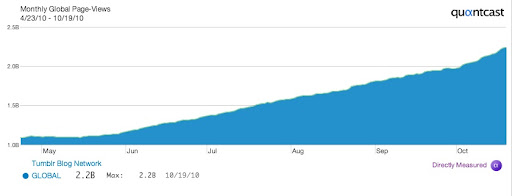
    Tumblr, which is growing in popularity (especially among teens),

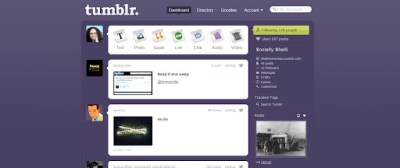
    has taken a silent step in support of gay teens by turning their normally blue dashboard a subdued shade of purple.

    Interestingly, as of this posting, the Tumblr Staff Blog makes no mention of the dashboard change.

    We’ve seen online organizations do similar things like this before. Google changes its logo for all sorts of occasions, and in support of many different causes, but I can’t think of any that have been on such a timely, controversial issue. Many Tumblr users are not happy with the change, while others are elated. I, for one, am glad some companies and organizations on the web are brave enough to take a timely stance on difficult issues.

    Is this the beginning of more socially conscious social networking sites?