Category: Social Media Resources

  • The Social Media Sales Funnel

    With the proper blend of strategy, community management and paid campaigns….

    …Social media can help you:

    • Increase brand awareness and visibility
    • Improve customer loyalty and retention
    • Launch new products
    • Gain marketing insights
    • Increase site traffic and conversions
    • Answer your client’s customer service questions

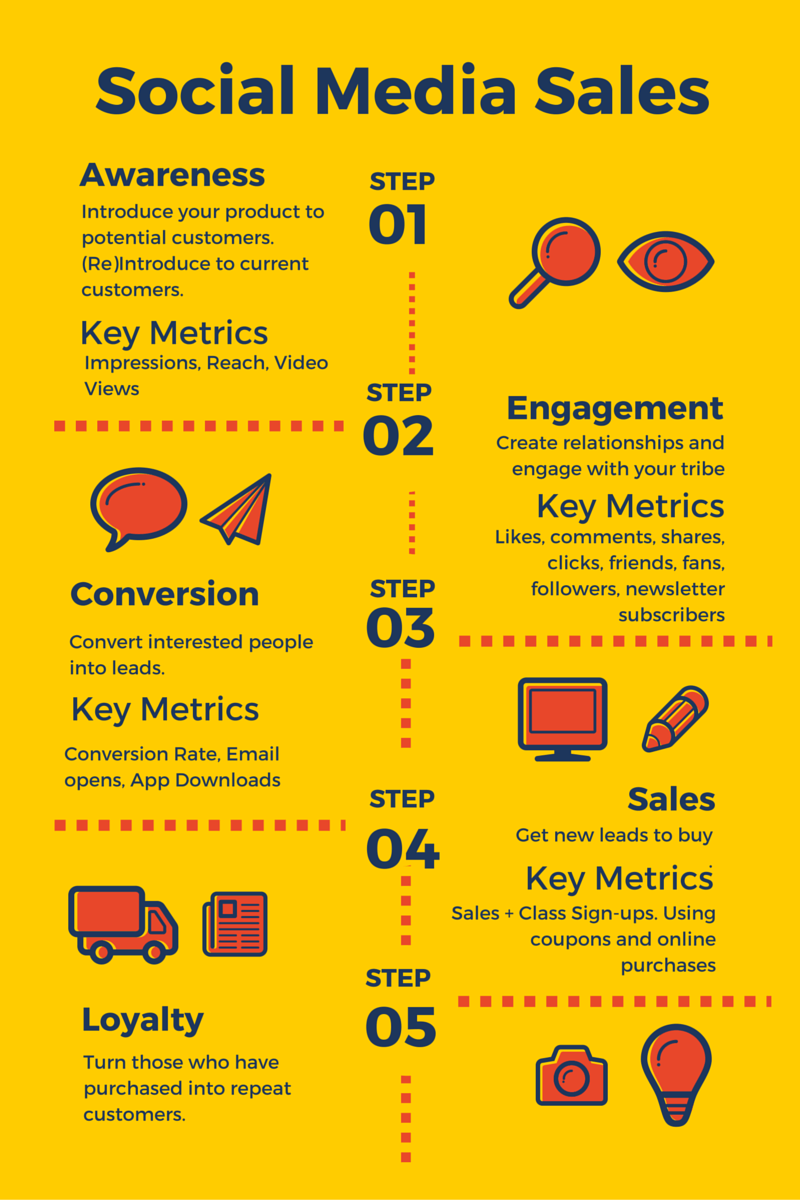
    But what does the process look like? I’ve put together a quick infographic using Canva to illustrate:

    Social Media Sales

    #1) Awareness

    • Objective: Introduce your product to potential customers. (Re)Introduce to current customers.
    • Key Metrics: Impressions, Reach, Video Views

    #2) Interest/Engagement Stage:

    • Objective: Create relationships and engage with your tribe
    • Key Metrics: Engagement (likes, comments, shares), Clicks, Friends/Fans/Followers, Newsletter Subscribers

    #3) Conversion Stage:

    • Objective: Convert interested people into leads by offering them something for (almost) nothing.
    • Key Metrics: Conversion Rate, Email opens, App Downloads

    #4) Sales

    #5) Loyalty

    • Objective: Turn those who have purchased into repeat customers.
    • Key Metrics: Same as engagement (likes, comments, clicks). # of Participants in a loyalty program.
  • 20 Helpful Tools for Social Media Marketers

    Here it is: A small (yet mighty!) list of tools anyone can use to grow business, reach more people, or get to know an audience better.

    pablo

    Research + Learn

    Manage + Build

    Design + Images

  • 20 Easy to Use, Free, and Reliable Tools for Social Media Management

    One of the questions I get asked most is, “What tools do you use for social media?” and I often have to say something like, “it depends.” There are lots of social media tools out there each with it’s own purpose, strengths, and limitations.

    I like to tell people I’m tool agnostic. It’s a term that was originally coined by Monique Elwell (at least that’s who I originally heard use it) and I love it because it accurately describes how I view Social Media tools. I’m not loyal or faithful to any one specific tool, per se. I choose tools that help me get the job done; those that are easy to use, free (or reasonably priced), and reliable.
    Wrench

    Here are a few of my favorites broken down by what I use them for:

    Collaboration/Project Management

    • Google Docs/Drive – Google has an entire suite of free apps that make content creation and collaboration simple no matter where in the world you are working from. Changes are real-time and everything is stored in the cloud so you can access it from any device and share your work with anyone.

    • Trello – Trello is an awesomely engineered, free, and easy to use project management site. Use it to keep track of checklists, due dates, team members, upload attachments and more.

    Finding & Curating Content

    • Reddit – Reddit is called “the front page of the internet” and it’s my new addiction. I’m checking my favorite subreddits from my smartphone whenever I have a few free minutes to myself. To explain it simply: content is submitted and voted up or down by users. The good stuff always floats to the top and the conversations are as informative as they are weird, silly and awesome. The best news always hits reddit first.

    • Scoop.it – Admittedly, my awesome colleagues Karen and Nik are bigger scoopers than I, but it’s still a place I go to find information on my favorite topics.

    • Feedly – Long live RSS! Sadly, Google Reader is no more. For years I’ve used Google Reader to track my favorite blogs. It saved me the pain/hassle of visiting 100+ websites daily by bringing their content to me automagically. With Google Reader saying goodbye, I’ve made the switch to Feedly which essentially does the same thing. Click here for an awesome list of social media marketing resources to fill up your Feedly.

    Finding, Editing and Creating Images

    I wrote an entire post about this. But, my top 5 faves are:

    • Instagram – No surprises here, right?

    • Google+ – Did you know you can edit images using Google+? Yep! Google provides some great filters, plus you can add text.

    • Stock Xchng – One of the best free photo sites out there.

    • Flickr  – Per Flickr, “Many Flickr users have chosen to offer their work under a Creative Commons license”, and you can browse or search through content by clicking Advanced Search > Only search within Creative Commons-licensed content.

    • Quozio – Have an excellent quote burning a hole in your pocket? Quozio will make it a pretty image – fast!

    Daily Management

    • Hootsuite – An all-in-one dashboard to manage multiple social networks including: Twitter, Facebook, LinkedIn, Google+ Pages, Foursquare, WordPress, and more.

    • Buffer – Add interesting blog posts, pictures, and even video to your Buffer Queue and it automatically shares them with your audience throughout the day.

    • Pages Manager (Android and iOS) – Keep tabs on your Facebook Pages even when you’re not near the computer.

    Listening

    I wrote an entire post about this too, but my top 5 faves are:

    Measurement

    If you’re not sure what or how to measure, start here.

    • Hootsuite – Build custom reports using over 40 social analytics “modules” or select from pre-made reporting templates.

    • Facebook Insights – Every page has Facebook Insights which provide metrics around content. You can export your metrics and use them to analyze user growth and demographics, consumption of content and more.

    • Sprout Social – Sprout Social helps you to create beautiful reports that get both a high or low level look at performance.

    • Bit.ly – A quick and easy way to track links (Count clicks, see how platforms are performing).

    Automation

    IFTTT – A service that triggers actions based on a simple formula: If THIS then THAT. For example, you can automate a post to your Facebook Page every time you share a picture on Instagram with a certain hashtag. I always warn people to use automation with extreme caution and to avoid it whenever possible.

    Which tools do you use for social media management? Did I miss any good ones?
  • 8 Free Tools for Listening to Conversations in Social Media

    Imagine the last party you went to. Think about who you were with, how you presented yourself, who you spoke with and what you talked about. Now imagine a complete stranger walking up to you, opening his coat, and shouting, “Hey! Wanna buy some of our COOL watches? They’re buy one get one free if you act NOW!”

    How quickly would you run away from this strange person?

    It may seem like an exaggeration, but I assure you, that’s how awkward a sales pitch can come across in social media. If you approach people like the weird, watch-selling-trenchcoat-guy no one will want to talk to you. Even worse, you could potentially alienate yourself from the very people you hope to interact with.

    Social media is about conversation, engagement, providing good content and above all else — listening.

    As with “real life” it’s best to enter a conversation after first listening. Listening tools can help you:

    • Know the context of the conversation online and pinpoint what is being said.
    • Determine the things your potential audience likes to discuss.
    • Identify and understand the people within the social landscape (i.e. Who they are and what they want).
    • Create content (conversation) that is geared towards the people you’d like to connect with.

    8 Free Tools

    There are many Social Media listening tools at your disposal. Some of the best get quite expensive, but if you’re operating on a small budget, these 8 free tools can help you listen in on the conversation before and while you participate:

    1. Google Alerts – Get email updates of the latest relevant Google results (web, news, blogs, etc.) based on your keywords and terms. Google Alerts will monitor the web for you while you’re doing other things.
    2. Google Reader  – Google Reader is a tool for gathering, reading, and sharing all the interesting blogs and websites you read on the web. Collect relevant industry blogs in your reader and check them often.
    3. Social Mention – Social Mention provides real-time search of “100+ social media properties directly including: Twitter, Facebook, FriendFeed, YouTube, Digg, Google etc.” You can sort and filter your results (alerts to come).
    4. Topsy  – Similar to Social Mention, you can use Topsy to perform real-time searches of Google Plus and Twitter. Per Topsy, “Topsy is a realtime search engine powered by the Social Web. Unlike traditional web search engines, Topsy indexes and ranks search results based upon the most influential conversations millions of people are having every day about each specific term, topic, page or domain queried.”
    5. Hootsuite &/Or Tweetdeck: Organize your search with the help of columns. You can search keywords, phrases, hashtags, twitter lists, etc. Nik Hewitt wrote a great post about optimizing your Hootsuite searches.
    6. Twitter Trends Map  – Trendsmap is a great way to monitor what is being said on Twitter in your area.
    7. What the Trend  – Find out what topics are trending on twitter, what they mean, and how they might be relevant to your audience.

    BONUS: Wondering what terms and keywords to help you listen? Adamn Holdenbache from Social Fresh has your answer.

    Which tools do you use to listen in on social media conversations? Did I miss any good ones?

  • 16 Image Creation Tools to Improve Your Content

    For many brands and businesses photo albums and photos on Facebook can get up to 180% more engagement and social networking sites like Tumblr and Pinterest drive incredible amounts of traffic back to blogs and websites via images. To put it bluntly, images are more important than ever when it comes to online marketing. Unfortunately, not everyone has the time (or skills) to regularly produce images. Luckily for them, however, there are some free and easy tools that help with image creation in a pinch. Here’s a list of a few of my favorites.

     to Improve Your Content

    Have Smartphone, Will Travel

    If you have time to take your own pictures (or already have a few you’d like to use) and you want to edit them quickly, use some of these tools:

    1. Instagram – No surprises here, right?
    2. Google+ – Did you know you can edit images using Google+? Yep! Google provides some great filters, plus you can add text.
    3. Twitter – Twitter has photo filters now. Here’s how to get started.
    4. Facebook – Use Aviary Editor to edit photos for your Facebook profile (please note: This isn’t compatible with Pages just yet).
    5. Photovisi – An easy way to create photo collages.
    6. Pixlr – Pixlr has smartphone and web apps.

    Free Photo Archives

    1. Stock Xchng – One of the best free photo sites out there.
    2. Flickr  – Per Flickr, “Many Flickr users have chosen to offer their work under a Creative Commons license”, and you can browse or search through content by clicking Advanced Search > Only search within Creative Commons-licensed content.
    3. Wikipedia – Wikimedia Commons is a media file repository making available public domain and freely-licensed educational media content.
    4. Morguefile – They say the provide, “high resolution stock photos for your illustration, comp or design needs.”

    No Camera Needed

    No time to break out the camera? That’s fine too!

    1. Quozio – Have an excellent quote burning a hole in your pocket? Quozio will make it a pretty image – fast!
    2. Recite – Creates fun quotes and text-based images. Their branding appears on the image.
    3. Roflbot – Creates meme-worthy pictures quickly. You can use your own pic, a pic from the web, or let Roflbot randomly select an image. Their branding appears very small on the bottom right hand corner of saved images.
    4. Memegenerator – Another meme creator. Use already established memes and images and add your own unique slant
    5. SomeECards – Might be funny for another few months. Maybe.
    6. Polyvore – This is a fashion-realted photo site that allows you to create and edit outfits and shopping related imagery.

    Which tools do you use to create images? Did I miss any good ones?